A smoky kitchen, lingering cooking odors, and the frustrating silence of a range hood fan that refuses to whir to life can quickly turn meal prep into a chaotic experience. As the unsung hero of your kitchen, a functioning range hood is crucial for maintaining air quality, removing grease, and ensuring a comfortable cooking environment. When it suddenly stops working, it’s natural to feel overwhelmed. But don’t despair! Many common issues preventing your range hood fan from turning on can be diagnosed and fixed with a few basic tools and a bit of DIY confidence. This comprehensive guide will walk you through the most frequent culprits and provide clear, step-by-step instructions to get your fan back in action quickly, saving you time and potentially costly repair bills.
Why Your Range Hood Fan Won’t Turn On: Common Culprits
Understanding the potential reasons behind your range hood’s sudden silence is the first step toward a solution. From simple electrical glitches to component failures, several factors can prevent your fan from operating. Identifying the correct problem will streamline your troubleshooting process and lead you to the most effective fix.
Power Supply Issues
Often, the simplest explanation is the right one. A lack of power is a leading cause of a non-functional range hood fan. This could stem from various points in your electrical system, preventing electricity from reaching the appliance.
- Tripped Circuit Breaker: An overloaded circuit can cause the breaker in your home’s electrical panel to trip, cutting power to the range hood.
- Blown Fuse: Some older range hoods or specific models might have an internal fuse that blows in response to a power surge, similar to a circuit breaker.
- Loose or Unplugged Cord: A power cord that has become dislodged from the wall outlet or the hood itself will obviously prevent operation. For hardwired units, loose connections can be the culprit.
- Faulty Wall Outlet: The electrical outlet itself might be defective, failing to supply power to any appliance plugged into it.
Faulty Fan Switch
The fan switch is your direct interface with the range hood’s motor. With constant use, these switches can wear out, malfunction, or simply fail to make proper electrical contact, despite appearing to be in the “on” position. If your range hood lights work but the fan doesn’t, a faulty switch is a strong possibility.
Motor Malfunctions
The motor is the heart of your range hood fan, responsible for turning the blades and moving air. If the motor itself is compromised, the fan won’t spin.
- Burned-Out Motor: Prolonged use, overheating, or a power surge can cause the motor to burn out, rendering it inoperable.
- Worn-Out Bearings: Over time, the motor’s shaft bearings can wear down, causing friction that prevents the motor from starting or rotating freely. This often manifests as a humming sound without the fan spinning.
- Internal Motor Issues: Less commonly, internal components within the motor can fail, even if power is supplied.
Capacitor Failure
|
Our Picks for the Best Range Hood in 2026
As an Amazon Associate I earn from qualifying purchases.
|
||
| Num | Product | Action |
|---|---|---|
| 1 | Empava Ductless/Ducted Range Hood Under Cabinet 30 Inch, Touch Control, 300 CFM Plug in, Stainless Steel |

|
| 2 | AMZCHEF Under Cabinet Range Hood 30 Inch, 750CFM Stainless Steel Kitchen Stove Vent Hood 3 Speed Exhaust Fan Touch/Remote/Gesture Control LED lights Time Setting Dishwasher-Safe Baffle Filters |
|
| 3 | AAOBOSI Range Hood 30 inch Under Cabinet,800-CFM Gesture Sensing/Touch Control/Motor Upgrade Low Noise,3 Speed Range Hood with LED Lights Exhaust Fan, Stainless Steel Kitchen Vent Hood |
|
| 4 | COSMO COS-5MU30 30 in. Delta Collection Ducted Under Cabinet Range Hood, Button Controls, Reusable Filters, LED Lights, Stainless Steel |
|
| 5 | Range Hood 30inch Under Cabinet, 900CFM Stainless Steel Kitchen Vent Hood with Gesture/Touch Control and Permanent Stainless Steel Filters, Ducted Vent, Top and Rear Vents |
|
| 6 | Wall Mount Range Hood 30 inch with Ducted/Ductless Convertible Duct, Stainless Steel Chimney-Style Over Stove Vent Hood with LED Light, 3 Speed Exhaust Fan, 450 CFM |
|
| 7 | VIKIO HOME Wall Mount Range Hood 30 inch, 580 CFM, Ducted/Ductless Convertible, Stainless Steel Kitchen Vent Hood with 3-Speed Fan and LED Lights |
|
| 8 | COSMO COS-63175S 30 in. Vista Collection 380 CFM Ducted Wall Mount Range Hood, Touch Controls, LED Lights, Stainless Steel |
|
| 9 | Empava Wall Mount Range Hood 30 Inch, Ducted/Ductless Kitchen Exhaust Stove Vent with Modern Style, 400CFM, 3-Speed, Touch Control, Timer, LED Lights, Stainless Steel (Charcoal-Filter Sold Separately) |
|
| 10 | Broan-NuTone BCSQ130SS Three-Speed Glacier Under-Cabinet Range Hood with LED Lights ADA Capable, 1.5 Sones, 375 Max Blower CFM, 30-Inch, Stainless Steel |
|
In many single-phase AC motors, including those found in range hoods, a capacitor is essential for providing the initial electrical “kick” needed to start the motor and maintain its operation. A failing capacitor can leave the motor without the necessary torque to begin spinning.
- Symptoms of a Bad Capacitor: A common sign is a buzzing sound from the motor when you try to turn the fan on, but the fan blades do not move. If the motor hums but doesn’t turn, the capacitor is likely the problem.
Obstructions
While less likely to cause a complete failure to turn on (unless severe), obstructions can put immense strain on the motor, potentially leading to its failure over time. Even if the fan tries to start, it might struggle or appear not to work effectively.
- Clogged Filters: Grease and debris can build up on filters, restricting airflow.
- Blocked Ductwork: External vents can become blocked by debris, leaves, or even small animal nests, preventing air from being expelled.
- Damaged or Jammed Fan Blades: Debris, grease, or physical damage can prevent the fan blades from rotating freely.
Step-by-Step DIY Troubleshooting and Fixes
Before you begin any repairs, remember that you are working with electricity. Safety should always be your top priority.
Safety First: Disconnecting Power
Always start by completely disconnecting power to your range hood. This crucial step prevents electric shock and injury.
- Unplug the Range Hood: If your range hood is plugged into a wall outlet, simply unplug it.
- Turn Off the Circuit Breaker: For hardwired units or if you can’t easily unplug it, locate your home’s main electrical panel and switch off the circuit breaker that controls your kitchen or the specific range hood circuit. Consider testing the outlet with another appliance or using a voltage tester to ensure the power is truly off.
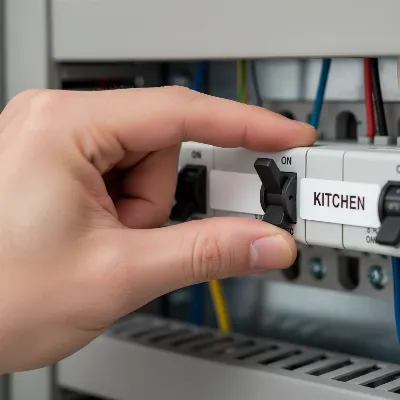 A person turning off a circuit breaker to disconnect power to a range hood, emphasizing kitchen safety during repairs.
Checking the Power Supply
Once power is safely disconnected, you can investigate the electrical flow.
- Check the Outlet/Plug: Ensure the range hood’s plug is fully seated in the outlet. If it’s a hardwired unit, visually inspect the wiring connections for any looseness or damage (only if you are confident with electrical work).
- Test the Outlet: Plug another small appliance (like a lamp or a phone charger) into the same outlet to confirm it’s supplying power. If the other appliance also doesn’t work, the issue might be with the outlet itself, a tripped breaker, or a blown fuse.
- Reset the Circuit Breaker: Go to your electrical panel and check if the breaker for your kitchen or range hood has tripped (it will usually be in an “off” or middle position). Flip it firmly to the “off” position, then back to “on.”
- Check for Blown Fuses: Some older homes or specific range hood models might have fuses. Inspect them for any signs of a blown fuse (e.g., a broken filament or discolored glass). Replace if necessary, ensuring the new fuse matches the original’s amperage.
Inspecting for Obstructions
Visual inspection can reveal simple mechanical issues.
- Remove Filters: Pull down the latch tabs (or follow your manual) to remove the grease filters. These are typically metal mesh or baffle filters.
- Check Fan Blades: With the filters removed, you should have access to the fan blades. Carefully inspect them for any accumulated grease, debris (like food particles), or physical damage. Ensure they can spin freely by gently rotating them by hand. Clean any buildup with a degreaser and a cloth.
- Inspect Ductwork (if accessible): If your range hood vents externally, a blocked duct can hinder airflow. While checking internal ductwork might be complex, you can often visually inspect the external vent cap for obstructions like bird nests or leaves. Clear any blockages.
Testing and Replacing the Fan Switch
If power is reaching the hood but the fan isn’t turning on, the switch is a prime suspect.
- Access the Control Panel: You’ll typically need to remove the filters and then unscrew a bottom panel or control cover to access the switch. Refer to your range hood’s manual for specific instructions on disassembling the unit.
- Visually Inspect the Switch: Look for any obvious signs of damage, such as burnt marks, loose wires, or corrosion.
- Test with a Multimeter (Recommended): If you have a multimeter, set it to continuity mode. Disconnect the wires from the fan switch (take a photo first for reference!). Touch the multimeter probes to the switch’s terminals. When you press the switch, the multimeter should show continuity (a beep or a reading close to zero ohms). If it doesn’t, the switch is faulty.
- Replace the Switch:
- Squeeze the locking tabs (or unscrew nuts) holding the old switch in place and push it out of the front of the control panel.
- Connect the wires to the new switch, matching the original configuration (using your photo).
- Push the new switch into the opening until it snaps or is secured into place.
- Reassemble the control panel and filters.
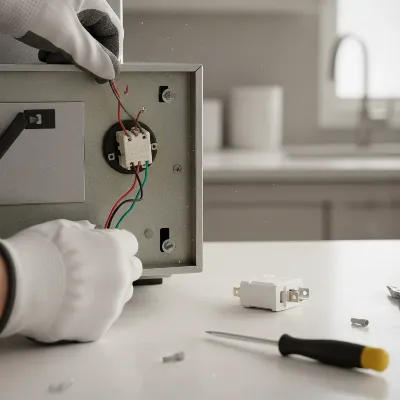 Detailed view of a person replacing a faulty fan switch in a range hood control panel, highlighting electrical connections.
Diagnosing and Replacing the Motor
A motor replacement is a more involved DIY task, but it’s manageable for those comfortable with basic appliance repair.
- Access the Motor: After disconnecting power and removing filters/panels, locate the fan motor, usually housed within the blower assembly.
- Inspect for Damage: Look for visible signs of damage, such as burnt wiring, a seized shaft, or excessive grease buildup preventing movement. Gently try to turn the fan blades by hand to feel for resistance or grinding. If the motor hums but doesn’t spin freely, worn bearings or a bad capacitor (covered next) are likely.
- Test the Motor (Advanced): With a multimeter, you can test for continuity in the motor windings if you have access to the wiring diagram and are experienced. However, this is often best left to a professional. If you hear a hum but no spin, or nothing at all, a replacement is usually indicated if power is confirmed to be reaching the motor.
- Replace the Motor:
- Disconnect the wires leading to the motor (take a clear photo of all connections).
- Remove the screws or bolts securing the motor to the blower housing or mounting plate.
- Carefully detach the old motor.
- Install the new motor, aligning it correctly and securing it with screws/bolts.
- Reconnect the wiring according to your photo, ensuring all connections are secure.
- Reassemble the range hood.
Replacing the Capacitor
If your motor hums but the fan doesn’t turn, a faulty capacitor is a highly probable cause.
- Locate the Capacitor: The capacitor is typically a cylindrical or rectangular component, often located near the motor or within its wiring enclosure. You’ll need to remove panels to access it.
- Discharge the Capacitor (CRITICAL SAFETY STEP): Capacitors can store a dangerous electrical charge even after power is disconnected.
- Using a screwdriver with an insulated handle, carefully place the blade across the capacitor’s terminals. You might see a spark or hear a pop, indicating it’s discharged. Hold it for a few seconds to ensure a full discharge.
- Alternatively, use pliers with insulated handles to briefly short the terminals.
- Inspect the Capacitor: Look for signs of damage like bulging, leaks, or burn marks.
- Replace the Capacitor:
- Note the wiring connections (take a photo).
- Disconnect the wires from the old capacitor.
- Remove the old capacitor from its mounting clips or bracket.
- Install a new capacitor with the exact same capacitance value (measured in microfarads, µF) and an equal or higher voltage rating as the original. Using an incorrect capacitor can damage the motor.
- Connect the wires to the new capacitor, matching your photo.
- Secure the new capacitor in place.
- Reassemble the range hood.
When to Call a Professional
While many range hood issues are DIY-friendly, some situations warrant the expertise of a qualified appliance technician or electrician.
- Persistent Electrical Issues: If a circuit breaker repeatedly trips after you’ve reset it, or if you suspect faulty household wiring, it indicates a deeper electrical problem that requires professional attention. Attempting to fix complex electrical issues without proper training can be dangerous.
- Complex Disassembly: If your range hood’s design makes accessing internal components exceptionally difficult or requires specialized tools you don’t possess, calling a professional can prevent accidental damage.
- Uncertainty or Lack of Experience: If you’re uncomfortable working with electrical components or are unsure about any step in the troubleshooting or repair process, it’s always safer to consult an expert.
- Beyond Basic Repairs: If you’ve replaced the switch, motor, and capacitor, and the fan still doesn’t work, there might be an issue with the main control board or other complex electrical components that a professional can diagnose with specialized tools.
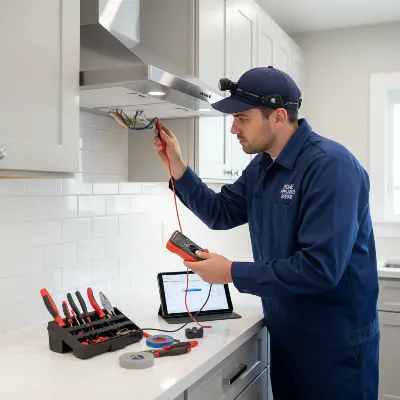 A professional technician diagnosing a complex range hood issue, highlighting the need for expert help in certain situations.
Conclusion
A malfunctioning range hood fan can be a major inconvenience, but with this guide, you now have the knowledge and steps to tackle many common problems yourself. From ensuring a proper power supply to replacing a faulty switch, motor, or capacitor, many DIY fixes are within reach. Always prioritize safety by disconnecting power before starting any work, and don’t hesitate to call a professional if you encounter complex electrical issues or feel uncomfortable with the repair. By taking proactive steps, you can restore your range hood’s functionality,
